Wednesday, October 21, 2020

Authentication Factor 3: Something you are, like your thumbprint (Cybersecurity Awareness Month, Day 21)

(image credit: engin akyurt at Unsplash)

To protect your digital devices and private data from unauthorized access and/or abuse, you need to use technology known as authentication. In the context of computing devices and online services, authentication is typically taken to mean "making sure people are who they say they are." 

In the preceding articles for Cybersecurity Awareness Month—Authentication 1 and Authentication 2—I explained that there are multiple ways for computing devices and online accounts to authenticate people. They can ask you to provide one or more of the following, shown here with their technical category names:
Today's article is about the last category of "authentication factors," commonly referred to as biometrics. Broadly defined, biometrics are measurements of human characteristics. However, in the context of computer science and security, a biometric is defined as "a measurable physical characteristic or personal trait used to recognize the identity, or verify the claimed identity, of a person through automated means." 

That particular definition of a biometric comes from the International Biometric Association, which I quoted in my 1991 book on security. Believe it or not, biometrics were already being used back then, sometimes to control access to computing facilities. Today, they are in much wider use and may even be built into your phone. tablet, or laptop computer. 

Biometrics include your fingerprints, your face, the sound of your voice, the veins in your hands and eyes, and behavioral traits such as your signature, handwriting, and typing rhythm, all of which can be recognized "by automated means." For example, I am writing this on a Macbook and to prove that I am the authorized user, Stephen Cobb, I let it scan one of my registered fingertips (there is a special key on the keyboard that is actually a fingerprint reader).

We have seen fingerprint readers on smartphones in recent years, but the technology has been available as an added level of security for laptop and desktop computers for many years (for example, integrated into a mouse, or a USB stick). Some laptops now let you use the integrated camera for authentication by means of facial recognition.

In general, I am a fan of biometrics as an authentication factor tied to a specific device or account. Unlike tokens that might be stolen or passwords that might be shared, biometric identifiers cannot be transferred either by theft or gift. A properly implemented biometric authentication system offers a fairly positive identification of an individual person. 

(I am not a fan of broad uses of biometrics, such as facial recognition, in public places, at scale, but I don't have time to get into my thinking on that right now.)

Unfortunately, basic biometric access controls, like those on your phone, are not without problems. For example, facial recognition can present practical challenges, some of which the COVID-19 pandemic has revealed. For example, put on a mask and your device may not recognize you. That means you may need to full your mask up and down several times a day. 

Another important pandemic precaution, washing your hands, can introduce another wrinkle, pun intended. Do you sometimes find that your phone won't recognize your fingers when you're soaking in the bathtub? It has definitely happened to me. That means you have to enter your passcode, hopefully without the phone joining you in the tub. Other scenarios, like wearing gloves and having to bandage fingers, create problems when a device won't unlock without reading your fingerprint. 

While biometric authentications are likely to evolve quite quickly in response to these issues, any given authentication systems based on biometrics needs alternative 'emergency' authentication processes. For example, if we're all going around talking to our phones, why not add an element of include voice recognition to make sure we are the rightful owner of the phone? Apple was actually filing patents on this idea a couple of years ago.

The bottom line is that using two authentication factors makes it less likely that someone can access your devices or accounts by pretending to be you. Using a biometric as one of those factors may be more appealing to some people than tokens. 

Let me end with something I wrote 25 years ago: Whatever you use for authentication, it is important to bear in mind that security problems go beyond proper user identification. Authorized users who are corrupt is a prime example. User integrity cannot be programmed or scanned. If authorized people log on and then share their account with others, the best biometrics are defeated. Proper data security, user education, and transaction tracking are equally important.

Tuesday, October 20, 2020

Authentication Factor 2: Something you have, like your phone (Cybersecurity Awareness Month, Day 20)

Authentication token technology collection: code generator, cards, USB, NFC, phone

The security and privacy of your digital devices and accounts are threatened by people who have found that gaining unauthorized access to such things can be very profitable, as described in this article, illustrated with screen shots of criminal markets on the dark web. 

And for as long as Cybersecurity Awareness Month has been observed, improving people's understanding and use of passwords—sometimes referred to as password hygiene—has been a recurrent theme. This makes sense because passwords have been a major line of defense against unauthorized access to computers and their contents for more than 30 years. 

Even today, a surprising number of information systems and services rely on passwords alone for authentication. That means they are just one bad-guessed-exposed password away from being compromised. Some of the limitations of passwords as an access control technology were described in yesterday's article. Today's article, written for Day 20 of Cybersecurity Awareness Month, focuses on another access control technology: a token or key that can add a second factor to user authentication. 

Whereas a password is something you know, a token or key is something you have, a physical object of some kind. To control access to laptops and workstations, this token could be a card with a magnetic stripe on it or a key fob with a chip in it. It could be a USB device you plug into your computer. Or it could be a code-generating gizmo like the one on the left in this collection of nine tokens.


As you can see, this collection of tokens includes a couple of mobile phones. There are several ways in which these can be used as tokens, typically by providing you with what is called a one-time code. This has become popular with online services that want to add a second authentication factor to account access. The basic assumption is that you are in possession of your phone and that you control who can use it.

For example, when logging into a bank account online, a name and password are typically used as the first authentication factor. But when you see something like "please enter the code we just sent to your phone," that is the second factor, the something you have, namely: your phone. 

These codes are a "one time password." Basically, a random string of numbers and/or letters that expire very quickly. In fact, timing is very important to this type of technology because the code generator is synchronized with the system you are logging into. 

In the collection above you can see a token that looks like a calculator, but it is actually a code generator. During authentication, the account to which the generator is linked will ask you to type in the code that appears on that small screen. Note that you can't get a code from the code generating device without first unlocking it by using its keypad to enter the assigned PIN. So you are using something you know to protect something you have and tie it to the authorized user.  

A variation on sending a code to your phone is for you to use an app on your phone that generates the code. On the right you can see the Google Authenticator app, which can be used by other companies as well (Amazon being a prime example, with apologies for the pun).  

As I said in the previous article on authentication, I recommend using a second factor whenever it is offered. The "code to/on your phone" is the second factor most widely offered for online accounts and it generally works well. However, I would be the first to admit that it can be annoying at times (like when your phone is in the upstairs bedroom and you are logging on from your laptop from the downstairs living room). 

I should also note that 2FA systems which send a code to your phone can get complicated if you lose your phone, or it is stolen, or you move to another country. I will try to write out some tips for handling those situations in a later blogpost (one of those tips is to get a Google Voice phone number).

You be who, and you've been what?

The small blue USB key pictured in the collection of tokens is a YubiKey, which can be used instead of a code generator for two factor authentication. This technology can be implemented inside companies, for internal network security, or by individuals who want to add 2FA to online services such as Facebook, Google, and Dropbox. According to this WIRED article on how to start using a YubiKey, once it is set up, for example to use with Facebook, it works like this: 
"place your YubiKey into your USB port. Once plugged in, the key should show you a blinking light...press the gold disk in the middle of the key...With that, your hardware two-factor authentication key is activated. The next time you try to log in to Facebook, instead of using a six-digit passcode to verify your identity, you’ll be asked to insert your YubiKey and give it a touch."
The Yubikey is make by a company called Yubico and I am giving them a shout out here because they recently sponsored some extensive research on password issues. It was carried out by the venerable Ponemon Institute, as discussed in this blog post, and it is available in full as a PDF at this link: The 2020 State of Password and Authentication Security Behaviors Report

The research findings show how much many organizations still rely on passwords, and why that is problematic. Here are some highlights: half of the respondents who were in IT said they reuse passwords across workplace accounts (as did four out of 10 individual users); 60% of IT security respondents said their organization relies on human memory to manage passwords (and 42% rely on sticky notes?); less than half of IT professionals require the use of 2FA to gain access to corporate accounts.

Remember what I said yesterday: passwords are susceptible to both "guessing by humans" and "deduction by software programmed by humans." Exactly how the latter works is not something I have time right to get into here, but what I do want to share with you before I end this post is the fact that, once passwords are discovered, they tend to get shared. 

When someone discovers someone else's password, that password is said to be pwned (slang based on "owned"). Right now there over half a billion pwned passwords, as documented by the website known as Have I been pwned? These are "real world passwords previously exposed in data breaches." As it says on the website—which is entirely legitimate and safe to visit—"This exposure makes them unsuitable for ongoing use as they're at much greater risk of being used to take over other accounts."

In fact, you can go to that website and enter your email address to find out if any accounts where you were registered with that address have been breached, thereby exposing your password for that account. Don't be alarmed if you get a response like the one I did: "Oh no — pwned! Pwned on 10 breached sites." 

If you scroll down the page you will see details of which websites exposed your password, and it is likely that some of the breaches are quite old. But if you still have accounts at any of those breached sites, go and change your password for that site. And then think for a minute. 

Can you remember if you are still using the same password from any of the breached sites? If so stop using it, anywhere. Also think about adding 2FA to your accounts. And if 2FA is not offered, learn more about what makes a strong password by playing with this password tester

#BeCyberSmart

Monday, October 19, 2020

Authentication Factor 1: Something you know, like a password (Cybersecurity Awareness Month, Day 19)

Image of logging into a phone, promoting the use of better passwords, from Stay Safe Online, Cybersecurity Awareness Month, Lock down your login

Using passwords to protect your personal devices, data, and online accounts is, in my opinion, one of the most annoying aspects of human interaction with digital technology, and it is a consequence of weaknesses in both. Like locks on doors that control access to spaces, passwords that control access to digital devices and services exist because not every human can be trusted to respect boundaries or resist the temptation to mess with and/or appropriate other people's stuff.

In this blog post, number 19 out of the 31 posts that I have pledged to write for Cybersecurity Awareness Month, 2020, I offer some hopefully helpful thoughts and information on passwords. In the next two posts I will talk about related technologies such as security tokens (Day 20), and biometrics (Day 21). Taken together these articles should explain the value of multifactor authentication—commonly abbreviated as MFA—as a way to improve the security of your digital assets. 

The availability and awareness of multifactor authentication has improved in recent years, but not enough. Too many of the digital places and things that you need to secure don't yet offer MFA, which is sometimes offered, or referred to, as 2FA, meaning two-factor authentication. 

Using 2FA/MFA can improve the security of digital devices and accounts, but it can also be confusing, particularly if it is not well-executed. I tend to think that is one of the main reasons why, even when MFA is offered, some people aren't using it (according to a recent study by Ponemon Research Institute, way less than half of individuals (36%) use 2FA to protect their personal accounts, see The 2020 State of Password and Authentication Security Behaviors Report). 

MFA does not necessarily eliminate elements of frustration and complication from cybersecurity, and of course there are ways for savvy criminals to get past MFA; however, despite all that, I recommend using MFA/2FA when it is offered.

What the MFA is authentication?

In the context of computing devices and online services, authentication is typically taken to mean "making sure people are who they say they are." When you try to access an online account, such as a bank account or email service, you normally need to identify yourself. 

In addition to entering a name or other piece of information that identifies you, such as an email address, you are asked to enter a password or passphrase. This is an authentication factor. In this case, it is something that you know which factors into making sure you are the person authorized to access the account. A password can be described as "shared secret" because, under ideal circumstances, it is only known to you and the entity with whom you have the account.

If you are granted access to the account after you have entered the password, then we say the account uses single factor authentication. In other words, the decision to grant access is based solely on you knowing the shared secret. (Some accounts use additional background information, such as your device's network address, to supplement the authentication process.)

Sometimes, after providing your password, an account might ask for more information, for example, "please enter the second and fourth digits of your six digit secret access code." I see this quite often in the UK and it is important to note that is NOT two-factor authentication; that code is another shared secret and so this is two levels of single factor authentication. 

A second authentication factor is when, for example, after you have entered the password, the login process then says something like "please enter the code we just sent to your phone." At first glance that sounds like just another shared secret, and the code itself is a shared secret, but the phone is a second factor, something you have. 

(Whatever that something you have might be, it should have its own authentication. For example, someone stealing your phone should be challenged by one of more authentication factors before they can access any codes that are sent to it.)

I will get deeper into the definition and description of this second authentication factor in the next blog post. There will be a third post that explores a third factor: something you are, such as your fingerprint or your handwritten signature. 

At this point we have established that there are three main factors of authentication, namely something you know, you have, and you are (it is also possible to use your location in determining authentication, although that enabled by something you have). If an authentication process, like logging into you workstation or bank account, requires more than one factor, that is multifactor authentication. 

The factors used can be any combination of two or more. For example: your fingerprint + password is 2FA; an object you have + a password + the sound of your voice is 3FA. In the next two articles I will look at why some of these combinations might be better than others, but it is now time to take a closer look at passwords. 

In cyberspace, passwords act like keys in meatspace, a.k.a. the physical world. Just as some doors into buildings won't open without the right key, some online spaces won't open up to you without the right password, Both physicals key and digital passwords offer the ability to keep things secure, but both technologies have their weaknesses. 

Password advice
You can open some locked doors without the key if you know how to pick locks (a skill that is, perhaps not surprisingly, a hobby for some computer security folks).

You can open some locked doors in cyberspace by guessing the password, a task at which computers themselves can excel, given the right software.

Fortunately, there are ways to make passwords harder to guess, as well as other technologies you can use for added security (such as those encompassed by multifactor authentication). I have posted some widely endorsed password advice on the right.

Note that in the context of passwords for digital devices and accounts the statement "harder to guess" includes both "guessing by humans" and "deduction by software programmed by humans." 

I will talk more about the latter later on. Right now we need to explore what is sometimes called the "soft password problem." This is not a new problem. Here is how I wrote about it thirty years ago:

We have a natural tendency to choose, as passwords and PINs, something that is easy to remember, like the last four digits of our home phone number or digits from our birthday, the characters of our vehicle license plate or street address. The problem is that these things are directly associated with us. Someone pretending to be us will most likely know these words and numbers and thus could guess your password. On the other hand, if the password is determined by someone else—handed to you by your bank for example—and means nothing to us, we might well feel compelled to write it down somewhere, potentially exposing it to other people.

If someone uses a password that is hard to guess because it is entirely random, they may feel the need to write it down because it is hard to remember. If you have ever been locked out of an important program or file because you can't remember the password, you will know that there is a huge incentive to keep a copy of passwords in something other than your brain.

While such commonly used passwords as "123456" or "password" or your home phone number might defeat an inexperienced user who has inadvertently stumbled on a protected file, there is little chance that they will present a problem for the experienced and determined interloper. Indeed, you can easily acquire extensive lists of commonly used passwords. 

Choosing and using hard passwords

Thirty years ago I stated that the ideal password is easy to remember and hard to guess and in many situations that is still true. To help people create such passwords, I suggested the following five guidelines:

  1. There should be no logical connection between the password and the user.
  2. There should be no logical connection between the password and the protected resource (building, system, file, etc.).
  3. If permitted, the password should contain a mixture of characters, both uppercase and lowercase, plus numbers, punctuation, and special symbols. 
  4. The password should be at least eight characters long.
  5. The password should not be a word that is in any dictionary.

These guidelines are still valid, but the fifth one requires clarification because some systems now allow very long passwords, sometimes referred to as passphrases. These can be easier to remember than complex passwords. For example, "I've got the month of May" would take a lot longer for a computer to crack than a very random password like mY3q9EVe!U5YUVdg that is hard to remember (according to this password strength checker). 

In my next article I will look at how automated password guessing and other developments have undermined passwords, and why you should use a second factor—such as something you have—in addition to a password, to better protect your digital assets.

What about password managers?

#BeCyberSmart 

Sunday, October 18, 2020

Warnings, alarms, and an aneurysm: the awareness juggling act (Cybersecurity Awareness Month, D18)

A vague and unhelpful warning, based on an image by Ingo Doerrie on Unsplash

One Friday evening, about 15 years ago, I arrived home from an out-of-town cybersecurity conference to find a letter from my cardiologist's office that simply said: "Aortic aneurysm detected, please call."

You're probably wondering what this has to do with Cybersecurity Awareness Month, and to be honest, it will take about half a dozen paragraphs for me to get to the connection, but please stick with me (we are now on Day 18 and it's a Sunday, so I'm feeling particularly reflective).

I don't know how familiar you are with human biology, but when I got that letter I was in my early fifties and less medically knowledgeable than I should have been, despite more than a decade of treatment for high blood pressure and being under the care of a cardiologist. My point is this: the words aortic aneurysm sounded deeply scary to me, but at the same time I didn't know what they meant.

My first thought was to call the cardiologist's office, but of course nobody was there because it was Friday evening, so I left a message to call me back ASAP, knowing that I probably wouldn't get a call any sooner than Monday. 

The next thing I did—as you can probably guess—was google aortic aneurysm. The results only added to me growing sense of dread, for example:

Aortic Aneurysms: The Silent Killer
Abdominal aortic aneurysms are the third leading cause of sudden death in men over age 60. Aneurysms are often called a “silent killer,” ...

Aortic Aneurysm - Cause Of Death For George C. Scott
Abdominal aortic aneurysms are the 13th leading cause of death in the U.S. Rupture of an abdominal aneurysm is a catastrophe. It is highly lethal and is usually ...

And those weren't tabloid newspaper headlines. Those were web pages from reputable sources (a university hospital and a division of WebMD). By this time my partner was urging me to calm down. She did her own googling and pointed out that even the Silent Killer article actually said, towards the bottom of the article:
"Fortunately, at least 95 percent of these aneurysms can be successfully treated if detected prior to rupture. Finding and treating an aortic aneurysm before the aneurysm ruptures is vital for patient survival."
And this is where I see the connection to one of the great challenges of cybersecurity awareness: how do you persuade people to act in ways that reduce the risk of something causing them considerable harm, without freaking them out? Here are three cybersecurity examples to consider as we try to answer this question: 
  1. If criminals get your Social Security number and decide to abuse it, the effects can be very upsetting and potentially costly. That's why you need to protect such information.
  2. If criminals acquire your credentials for the network at the hospital where you work, the effects can be very upsetting and potentially deadly. That's why it's important such protect such information.
  3. If an adversarial nation state actor acquires your credentials for the network at the power plant where you work, the effects can be very upsetting and potentially trigger regional destabilization that leads to armed conflict. So be sure to protect your network login.
I don't see anything factually inaccurate about these statements and all three are making worthy assertions about protecting information systems; but it seems to me that there's something "off" in #2 and #3. They escalate from security awareness to "deadly" and "armed conflict" in a way that might be alarming and unhelpful to a general readership. But these examples do help us to focus on a difficult question with which security professionals have wrestled for decades: how far should we go to make a point? 

Consider what my good friend Winn Schwartau said in testimony to Congress in 1991: "Government and commercial computers are so poorly protected today, that they can be essentially considered defenseless. An electronic Pearl Harbor waiting to happen." In my opinion, then and now, that was a valid statement and made a point that urgently needed to be made. 

However, other people, now and then, have criticized this testimony as alarmist, an adjective that the OED defines as "a tendency to exaggerate potential dangers or an eagerness to express fears or concerns publicly; esp. that creates needless worry or panic in this way." In other words, raising the alarm can be a good thing, but not always, depending on how, when, why, and to whom you do it.

One traditional approach to the balancing act we might paraphrase as "alerting people to something that could cause them considerable harm without freaking them out" has been to adjust the message according to the audience. Get it right, which I believe Winn did in his 1991 testimony to Congress, and you are performing a valuable public service. Get it wrong and you can end up getting all kinds of grief.

Ironically, nearly three decades later, that balancing act is trickier to perform than it used to be, thanks to the World Wide Web. What I mean is that publishing information on the web is not targeted, even if you think it is. You might write for a technical-savvy audience and think that's who is going to read what you write, so you can assume they will interpret your meaning accordingly. But unless your writing is hidden from search engines and/or protected by a paywall, your words may be read by people from a wide range of backgrounds, with varied levels of education, holding a variety of differing views about life.

That is why the guidelines for creating awareness content intended for use during Cybersecurity Awareness Month include the following advice: 
  • Don’t write material that feels threatening or fear-based
  • Avoid painting scenes like cyber-criminals waiting at every online intersection ready to steal social security numbers
  • Promote practical, empowering steps people can take

My initial reaction to seeing those guidelines was concern that they did not align with the sense of urgency that I feel about the need for humans to do better at cybersecurity. But on reflection—remember I said this was a day of reflection—I think they strike the right balance for messaging to the general population. 

There are indeed practical steps that people can take to reduce the odds of becoming a victim of cybercrime, and we should make sure everyone is aware of them. That is what cybersecurity awareness is about. The work that needs to be done to get politicians and policy makers to address cybersecurity with greater vigor than they have so far, that is something else.

Finally for today, if you're still wondering—and I hope you are—what happened with the aortic aneurysm alert that kicked off this article, here's the short version. After a less than happy weekend, I saw the cardiologist early the next week. He told me the aneurysm was relatively small but I needed to keep my blood pressure low, eat less salt, and more bananas (for the potassium). When I asked him how I could tell if the aneurysm was becoming a serious problem he said: "You'll just feel a sharp pain in your back but it won't last long because you'll soon be dead."

Shortly after that I got a second opinion, from the Mayo Clinic. The cardiologist there told me I didn't have an aneurysm and I would probably be fine if I avoided all alcohol and chocolate, kept my blood pressure low, ate less salt, and consumed more bananas (for the potassium). I cut back on most chocolate and all alcohol (ironically, just before going on a trip to Moscow with Winn, but that's another story). 

I also quit my somewhat stressful job as Chief Security Executive for an Internet provider (to help with the blood pressure and take stock of my life). Then, after about five years—during which we had to struggle hard to survive the Great Recession and my atrial fibrillation got worse—I went back into cybersecurity, working for a company that had an excellent health plan. 

So I saw a cardiologist about my AFib and, after a failed attempt to reboot my heart in the hopes of restoring a normal rhythm, he said there was nothing else he could do for me ("just keep taking the potassium pills"). That motivated me to figure out the underlying cause of all my heart problems. Turns out it was a condition called primary aldosteronism, which can sometimes be corrected with surgery, and in my case it was. I still have a wonky heartbeat, but my blood pressure is fine without any medications or added potassium.

And that's why, when it comes to dealing with risks, early awareness and accurate information are important, as is an appropriate level of motivational fear. However, when you're trying to reduce risk, there's nothing like addressing root causes.

Do your part, #BeCyberSmart

Saturday, October 17, 2020

Old school security awareness, a blast from the digital past (Cybersecurity Awareness Month, Day 17)


Why use an image of people being cyber-smart on their phones today, day 17 of Cybersecurity Awareness Month? Because it occurred to me this morning that I got into computer-related security awareness before the general public started using computers as phones (or phones as computers). 

In fact, this article is essentially a reprint of some basic computer security advice that first appeared in print nearly 30 years ago. (It lives on my old security book, a free PDF version of which available, in three parts, on this blog—the links are near the top right of the page you are now reading. I keep this available as an historical artifact because...well you know what they say about those who don't learn from history, they may decide to go back and read it some day). 

What follows, all the way to the last few lines of the article, was written way back in the first half of the 1990s:

You might be surprised to see people at the top of the personal computer security agenda. After all, we are talking high-tech problems here. However, security also is a people problem. Computers are a human invention, and if they don't work properly, it is humans who get hurt-sometimes financially, sometimes even physically.  

For the most part, the impediments to successful computing are human in nature, and not technical. If everybody woke up tomorrow thinking that it was wrong to mess with other people's information, then the next edition of this book would have fewer pages and sell less copies. Until this happens, the sad fact is that effective implementation of personal computer security requires you to take a dim view of human nature.  

Of course, it is not the purpose of this text to determine whether people are essentially good or evil. However, we can state categorically that human beings are, to varying degrees, devious, grasping, and downright rotten. To secure yourself and your organization against such character traits, you must be prepared to think like your adversary and realize that sometimes he or she is a miserable specimen (there are times when the expert in personal computer security is sorely tempted to agree with Sartre when he said "Hell is other people.")  

People might be your biggest risk, but they also are your best resource. Successful personal computer security depends upon good people more than anything else. If you have motivated, diligent, and careful people working with you, then a greater degree of security can be obtained and with less hassle. Without the cooperation of the people involved, even the most sophisticated security devices will fail. With cooperation, high levels of security can be obtained without recourse to expensive equipment. 

What is clear from experience is that both management and employees have security responsibilities. Working together, they can be very effective in protecting the company's computer resources. The British Government's 1993 Audit Commission report on computer abuse noted several areas of management responsibility:

  • The chief executive and management board must be determined to instill an awareness of the importance of computer security and be prepared to act when breaches occur. 
  • Line management in user departments must ensure that access to facilities complies with the organization's standards. 
  • IT management must assist in defining cost-effective controls that protect the data that it is holding and processing on behalf of others. It should educate users in the need for controls over computerized data. 

The same report identifies one other key element within management: internal auditors. They have a responsibility "to test and advise on the adequacy of security and controls...bring to management's attention any shortcomings...and emphasize the risks of all forms of computer abuse." 

The following are six quick and relatively immediate steps that management can take to improve information security: 

Step 1. Post security rules. Write up a basic list of rules that users should follow to preserve security. Display them prominently. Issue a memo to each employee that states the same rules in a form that can be kept handy. Consider posting a copy of the rules on each personal computer. 

Step 2. Announce computer security enforcement. Let people know that compliance with the security rules will be checked and considered part of job performance.

Step 3. Announce computer security incentives. Let employees know that compliance will be rewarded. Remember that people who breach security have an incentive to do so, even if it is just boredom.

Step 4. Open a computer security hotline. Let people know where they can get advice on security issues and give anonymous tips about security violations or suspicious activity.

Step 5. Issue computer security alerts. These can highlight specific weaknesses that have come to management's attention and stress the ongoing need for vigilance in maintaining security. In some cases, you might want to issue alerts in response to news items involving security breaches, but beware of giving employees specific details.

Step 6. Appoint a computer security officer. This raises awareness of the issue and sends a clear message about the organization's commitment to security. You don't have to hire a new employee for this position, but you do need to back the person you appoint with the appropriate resources and authority.

These steps are just a starting point. They are not meant as a substitute for an in depth risk analysis, security policy promulgation, and implementation program (these items are covered in the next chapter). The idea is to make big strides towards raising security awareness without spending a whole lot of money or scheduling a lifetime's worth of meetings. While these steps might sound like token gestures, they nevertheless can be very effective. For more detailed discussion about the human factors in computer security, see chapter 14, which suggests ways to improve security through a variety of personnel management tactics. 

Here is a sample set of security rules:

ALWAYS: 


1. Back up important data files.
2. Use your access password.
3. Use screen saver and keyboard lock.
4. Label all media and lock them up.
5. Check the ID of outsiders using PCs.
6. Report suspicious activity.
7. Scan floppy disks for viruses.
8. Log off unattended workstations.
9. Protect keys and passwords.
10. Assume someone somewhere is interested in stealing, damaging, or destroying your data and equipment.

NEVER:

1. Use obvious passwords, such as your name.
2. Write down, or be seen entering, passwords.
3. Share or reveal passwords.
4. Use same password for different systems.
5. Boot a PC with a floppy disk in drive A.
6. Install unlicensed software
7. Make unauthorized copies of software.
8. Leave unprotected modems in answer mode.
9. Leave unlocked computers unattended.
10. Assume that nobody is interested in stealing, damaging, or destroying your data and equipment.

Friday, October 16, 2020

We interrupt regular programming with this FBI message (Cybersecurity Awareness Month, D16)

Warning from FBI: Potential Charity Fraud Associated with the COVID-19 Pandemic

Sad, but true: "the FBI and other law enforcement agencies have received reports of scammers fraudulently soliciting donations for individuals, groups, and areas affected by COVID-19. They are leveraging the COVID-19 pandemic to steal your money, your personal information, or both."

Yes folks, it is now day 16 of Cybersecurity Awareness Month, 2020, and the scammers are still scamming. Some have even sunk so low that they are taking advantage of a global pandemic that has sickened millions of people. What a sick way to rip people off. 

This particular FBI warning caught my eye as I was surfing the fraud news this morning because it was such a timely reminder that no target is off limits to scammers (you can read the full warning online here).

As you may know if you've been visiting this site recently or if you follow me on Twitter, this year I pledged to write one cybersecurity awareness post for each day of October. Given that there are 31 days in October, I figure day 16 is the midpoint. I also figure it's a good day to pause and thank everyone for sharing the first 15 articles on social media (remember hashtag #BeCyberSmart). All the sharing and awareness raising you can do is much appreciated.

So, I hope you don't mind if today's article is a short one. To be honest, I've been a bit distracted helping a friend who is a worried they might have COVID-19. That's another reason the FBI alert caught my eye. Also, I love this line of actual FBI advice:

The best way to protect yourself is by doing your research. 

Amen to that! I recommend reading the FBI warning and advice and subscribing to future FBI alerts via email using the link on that page. 

Stay safe. #BeCyberSmart

Thursday, October 15, 2020

Cybersecurity Awareness Month, Day 15: Apartment rental scams and the Internet as fraud multiplier

A very good photo of an attractive and entirely legal apartment by Francesca Tosolini, kindly shared on UnSplash by @fromitaly
Back in September of 2011, I wrote: Internet scams are not new, and some of the strategies they use are not unique to the Internet, but there is no doubt that the Internet can provide a multiplier effect for people intent on defrauding others

Welcome to number 15 of the 31 blog posts that I am writing for Cybersecurity Awareness Month, October, 2020. Why am I doing this? Because ever since I made that statement, ethically-challenged individuals have repeatedly validated it, sometimes at scale, and at a cost to victims that is hard to calculate but now runs into billions per year. 

The graph on the right reflects only those losses suffered by victims of internet crime who filed reports with the FBI via IC3; yet it strikes me as pretty clear evidence that the Internet does indeed provide a multiplier effect for people intent on defrauding others. (For more on this data, seen this post from a few months ago.)

I was reminded of this multiplier phenomenon a few days ago when I was writing about cybercrime victim support. When I wanted to show readers how much information fraud victims can find at FraudSupport.org, I picked Real Estate/Mortgage Scams as an example. And that's when I remembered the experience Chey and I had with this scam back in 2011, when we were looking for a place to live in San Diego.

We were moving to San Diego because that's where ESET, the Internet security software company, has it's North American headquarters, and they had just hired me to work there. At the time we were living about 3,000 miles from San Diego, in Upstate New York. As it turns out the move itself gave me the content for my first piece of work for ESET, and article published on what would become WeLiveSecurity, the award-winning cybersecurity blog. 

I will paraphrase what I wrote back then: as geeks and researchers we saw this move as a chance to explore the impact of technology on the logistics of relocation, starting with a virtual reconnaissance mission to San Diego. Chey and I became immersed in online representations of San Diego. Using Google Earth and Google Street View we were able to acquire the lay of the land in San Diego County, starting with the downtown area around the ESET office and then venturing into adjoining neighborhoods. At the same time, I was entering important addresses—like the ESET office–into my Garmin GPS, while plotting a cross-country road trip using Microsoft Streets and Trips.

And then there was the virtual apartment hunting. 

While I pointed my laptop's web browser to Craigslist, Chey opted to use Craigslist Pro on her iPad. Almost immediately both of us spotted the same great deal: "Furnished 2BR/2BA Apartment $1,000/month." This was not just any apartment, it was a great looking apartment in a great location downtown, not far from ESET's offices, with great features:

"Fully furnished, the apartment has everything that you wished for, TV, DVD, a/c, internet, cable, towels and lines. The concrete walls make it quiet inside. Both bedrooms have walk-in closets. The rooms are very spacious…Very luxurious and modern."

This written description was supported by the very professional photos that accompanied the listing, one of which you can see here in this screenshot of the listing:

The part of the listing that was not supported—at least not by common sense—was the pricing of this fully furnished apartment. At $1,000 per month, the rent was suspiciously low, right on the edge of "too-good-to-be-true" territory. You would probably know this if you were already living in San Diego, but what if you were from out of town? People moving to the city for the first time—like us—could be taken in by this listing. Furthermore, the stress of moving to a new city might add to the temptation to believe this was a genuine deal.

But what was this listing trying to achieve? Someone had clearly made an effort to create an attractive and appealing listing, so there had to be a purpose. Was it a bait-and-switch scam? Or maybe a phishing exercise to obtain personal data? Or could it really be a just a great deal from someone who was desperate to rent out their place? 

As properly trained researchers, Chey and I decided to investigate. Using an online identity and email address reserved for just this kind of scenario, Chey contacted the person listing the property. The response pointed the way to the scam. 

In a nutshell, the scam goes like this: the con artist responds via email with a story about how she is out of the country, so she is proposing that the prospective renter send her the money for a deposit and the first few month's rent. Here is some of the language from the scammer's email:

"I have decided to rent the apartment because my financial situation is not so good at this time and I also cannot live in the US in the near future because I just received a new work contract on the Dunbar Oil platform in the North Sea (I work as an engineer ) and I will be there for at least 8 months per year….Because I am unable to show you the apartment in person I decided that it's better for both of us to use a multinational renting service, provided by Yahoo Real Estate."

Note that "Yahoo Real Estate" is another innocent bystander in this scam. Yahoo does NOT provide any property rental services. When someone responds that they are interested in renting, the scammer probably has a story about how it is cheaper and quicker to just send the money via Western Union. We did not take our research to that level because...we were trying to rent a real place so that I could start my real job, which included warning people not to fall for scams like this!

The multiplier effect of digital tech

So where does the "multiplier" effect of digital technology and the Internet come into the picture. Well, con artists had learned, well before the Internet existed, that people eager to rent a place to live could be tricked into paying money up front for a place, one that was either not real, or real but way different from the description, and not in a good way. What technology has done is make this scam: 

  • easier, through digital images, online listings, and electronic communications; 
  • less risky, because the scammer does not need to be physically present; and,
  • more lucrative, because you can do it in many cities at the same time.

That last point became clear when Chey—after notifying Craigslist of the scam—did some more research and found out something very special about this apartment: a very similar apartment was being offered for rent—at exactly the same time—in Boston, and in San Francisco, also Seattle, Washington, and several other cities. 

The scam artist had simply localized the description in each listing, but used the exact same format, photographs and listing parameters in each city. In other words, here is a scam that might not be worth the effort if you could only do it in one location, but global connectivity and the ease of digital replication make it a much more appealing strategy for parting people from their hard-earned money. 

Have we moved on?

Fortunately, eventually, we found a real place to rent. It was right across the street from the ESET building in San Diego's Little Italy. And we found it the old-fashioned way: walking around the area and calling phone numbers we saw on "For Rent" signs posted in apartment windows. (Ironically, there were quite a few of those signs in 2011, due to another, much bigger scam: the one that the big banks perpetrated on the American public and which led to the Great Recession.)

As for the scam documented here, I recently found out that it had also been perpetrated in Sweden, which suggests to me that this particular scheme might be Scandinavian origin. Here is someone's blog entry from July, 2011:

Look closely, toward the bottom, and you can see the infamous Dunbar Oil Platform gets a mention. The isolation of North Sea oil rigs is something that would ring true with folks in Scandinavia. However, digital forensics can be tricky. 

Remember this piece of text that I quoted from the ad: "internet, cable, towels and lines"? Did you spot that there was a typo? The word linens was spelled lines. When I quoted the scam listing on WeLiveSecurity I added "[sic]" to indicate that "the source is presumed to be erroneous and has been intentionally transcribed without correction." So it appeared in my article like this:

"internet, cable, towels and lines [sic]"

That was in 2011, but you can still find that exact text string, with the sic bit, out there on the Internet, and I don't mean in plagiarized uses of my article. In fact, I'm not sure why it is being used (there is currently one rental ad using it, but the listing is closed).

Cybersecurity Awareness Takeaway:
Search engines are your friends

That's right, whenever you have doubts about something you read on a website or in your email—like an unbelievably low price on something you need to buy—just copy or type part of the text of the dodgy item into the search box of your favorite search engine (e.g. Google, Bing, DuckDuckGo), and put it in quote marks like this:

"a string of text from the dodgy item"

For example, to check for this amazing apartment deal you could enter:

"Fully furnished, the apartment has everything that you wished for"

Very often it will be clear from the search results that other people have questioned this item, and you can steer clear of it. Of course, there is a chance this won't work, so a lack of results should NOT be taken as an "all clear." But it is a very handy sanity check that I use a lot.

#BeCyberSmart

Wednesday, October 14, 2020

Hacking is not a crime, and other problems with words in cybersecurity awareness (Day 14 of 31)

If you've been seeing messages about Cybersecurity Awareness Month you may that find you're now more aware of news headlines like these: 

Hackers steal data from school district, post it on the internet 

Coronavirus: How hackers are preying on fears of Covid-19?

Well, on the one hand, I'm very pleased if you're more alert to news of this nature, and I hope that you keep reading about the problems described in the articles. On the other hand, I have to say that those headlines are somewhat misleading. I'm not saying they are fake news, far from it, but those headlines wrongly confuse hackers with criminals. They should read:

Criminals steal data from school district, post it on the internet 

Coronavirus: How criminals are preying on fears of Covid-19

To be clear: people who hack computers for criminal purposes are criminals, not hackers. There are many people who engage in perfectly legal activities that definitely are hacking. And some hackers are very noble and selfless people. For example, right now there are people constructively "hacking" together programs and devices that can help the world deal with the Coronavirus pandemic, for example:

So, when editors and journalists lazily use hackers instead of criminals they are doing the world a disservice. As someone who has spent the better part of three decades trying to explain why the world needs to do more to shut down the criminal abuse of information technology, I can assure you that confusion over the word "hacker" has been a serious distraction if not an outright impediment. 

I have written about this criminal/hacker problem here and there is a whole "Hacking is Not a Crime" organization devoted to remediating the problem. The non-profit organization's mission statement says that it is: "seeking to raise awareness about the pejorative use of the terms "hacker" and "hacking" throughout the media and popular culture. Specifically, the negative connotation in which the terms are so often associated." 

The statement goes on to explain why that matters: 

"Hackers are often vilified and portrayed as evil, menacing, and even threatening individuals. Because of this, many hackers refrain from publicly disclosing physical and information security vulnerabilities they discover due to fear of legal retaliation. Subsequently, this is creating an increasingly hostile digital frontier due to compromises perpetrated by cybercriminals and threat actors. We therefore advocate state and federal legal reform which provides a safeguard for hackers conducting security research."

So, as your cybersecurity awareness grows, know that hacker does not equal criminal. and criminals who use hacking techniques to commit crimes are, simply criminals. 

For more on this, check out the Hacking in NOT a Crime website and follow @HackNotCrime on Twitter.

#BeCyberSmart

Tuesday, October 13, 2020

Basic resources for learning more about cybersecurity (Cybersecurity Awareness Month, Day 13)


It's day 13 of Cybersecurity Awareness Month and I'm guessing there are some folks out there for whom this is their first serious encounter with cybersecurity. We know for a fact that cybercrime has risen dramatically in 2020. By mid-April, FBI Deputy Assistant Director Tonya Ugoretz was saying that the number of internet crimes reported to IC3 had "quadrupled compared to months before the pandemic." In this article, written in May, I called it the Covid Effect (also available as a video).

So, if you're relatively new to cybersecurity you may find the jargon confusing. Or maybe you'd like to read more about cybersecurity but don't want to buy a whole book about it. I understand, and I say that as someone who has written whole books about it. 

I figured I would provide links to some resources for folks who are just getting into this. At the same time, these resources can be helpful if you're faced with training employees on security and/or raising security awareness among colleagues.

A Glossary of Common Cybersecurity Terminology: there are quite a few out there, but this one is nicely referenced and tied to standards.

A glossary more focused on malicious code: written by ESET malware researchers (malware is short for malicious software, also known as malicious code—like computer viruses and worms).

At StaySafeOnline.org you will find a good starting point for both learning about cybersecurity and helping others to understand the need for cybersecurity awareness. This site is also the hub of activity for the annual cybersecurity awareness month (October), now observed in many countries.

The award-winning blog WeLiveSecurity.com is a website offering security news, advice, opinion, and award-winning security research, presented in five languages: English, Spanish, Portuguese, German, and French.

Here are some of the leading associations of security professionals, all of whom have websites with articles worth reading:

(ISC)2: International Information System Security Certification Consortium, best known for creating the CISSP credential (Certified Information System Security Professional).

ISSA: Information System Security Association, which has a lot of local chapters but is also international.

ISACA: began as the Information Systems Audit and Control Association but now goes by just ISACA.

AITP: a broader IT group, the Association of Information Technology Professionals is part of CompTIA, a leading provider of certifications in IT and security.

The articles on the Krebs on Security website might be of interest once you start picking up the cybersecurity lingo. This site is where journalist Brian Krebs reports on some of the more interesting cybersecurity problems (he's the one who broke the news of Target breach, and quite a few more since then).

You can find a lot of cybersecurity news on the website of Graham Cluley, a security expert who is also a good writer and speaker. I encourage you to sign up for his newsletter, cheekily called GCHQ (the initials of Britain's top cybersecurity agency). 

Another good newsletter is Weekly Cybersecurity from Politico which examines the latest news in cybersecurity policy and politics.

In the same vein, check out the Third Way Cyber Enforcement Initiative where you can learn more about public policy issues related to cybercrime. All the articles there are written for non-technical readers.

There are lots more places to turn for cybersecurity information—including several subscription-based newsletters from women in cybersecurity that are well-worth paying for. I will cover these soon, but the above should get you started.

#BeCyberSmart

Monday, October 12, 2020

Cybercrime victim support: positive developments, growing resources (Cybersecurity Awareness Month, D12)


Thinking before you click any link in an email is good advice. But as the second full week of Cybersecurity Awareness Month 2020 gets under way, it is important to bear in mind this simple fact: all the cybersecurity awareness in the world cannot guarantee that you won't be victimized by people intent on abusing digital technology for their own ends. 

Of course, that's no excuse not to learn, and do, as much as you can about cybersecurity, but I'm sure all of us have been tempted to click dodgy email links at one time or another. And who hasn't received one of those dreaded notification emails that are sadly real: "we're sorry but your account information was exposed by a breach of our security." In other words, becoming a cybercrime victim is sometimes out of our hands. And that bring us to today's topic: what to do if you're a victim of cybercrime?

Fortunately, this question is a lot easier to answer today than it was even five years ago because numerous agencies and entities have stepped up to help cybercrime victims. A notable example in the US is the Cybercrime Support Network which runs the Fight Cybercrime website. Cybercrime Support Network (CSN) is "a public-private, nonprofit collaboration created to meet the challenges facing millions of individuals and businesses affected each and every day by cybercrime."

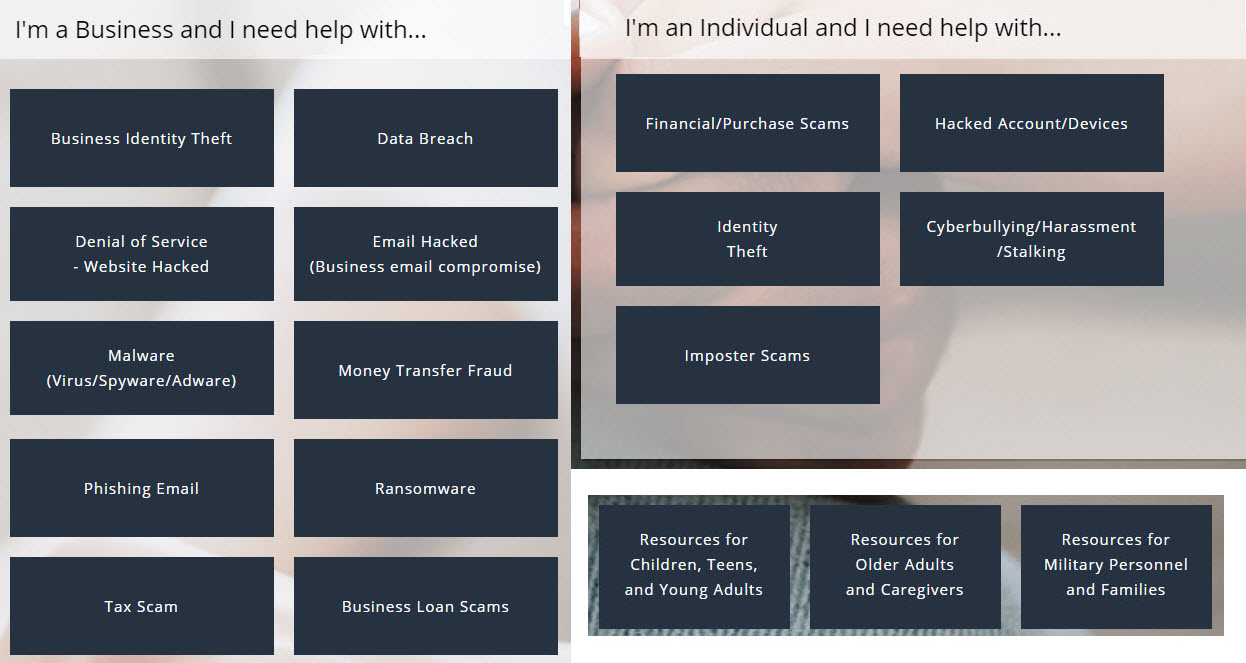
To help cybercrime victims the CSN website can direct you to suitable resources based on whether you are an individual or a business and what type of problem you are dealing with (the website is much easier to use than this image is to read—I made this mash-up to give you a sense of much help Fraud Support has to offer). 

There is a lot of helpful information for cybercrime victims on FraudSupport.org

CSN defines cybercrime and online fraud as "any illegal activity involving the internet, such as websites, chat rooms, email, and social media accounts." Examples include advance-fee schemes, non-delivery of goods or services, or fake employment/business opportunity scams. Basically, we're talking any crime that involves the use of the internet to communicate false or fraudulent representations to individuals and businesses. 

One of the things I really appreciate about the Fight Cybercrime site is how quickly you can find the right help when something has gone wrong. Suppose you're an individual who has experienced some form of internet-related fraud. Maybe you think someone is trying to scam you out of a deposit on an apartment. Chey and I ran into this scam a few moves ago and I'm going to blog about that experience later this week, but I wish Fight Cybercrime had been around back then. These days, but here's what you can do if this happens to you.

Go to the FightCybercrime home page and select "Get started". You will see a question—What Happened—and a series of answers, like I Lost Money and I Was Hacked. Alternatively you can choose from the Scams menu at the top of the page. If you chose Financial Purchase Scams you will be shown nine types of scams. In this example, Real Estate and Mortgage scams is closest to what you're dealing with. When you chose that option you get a page full of information about what you can do and who to contact. Furthermore you are given a systematic approach to dealing with the problem in three stages: Report, Recover, and Reinforce. Links and suggestions are provided for each stage.
   
FightCybercrime is the brainchild of Kristin Judge, a passionate advocate for cybercrime victims. And she's not stopping with online support. Her goal is to create a national cybercrime reporting infrastructure by 2021 so that anyone in the US will be able to dial “211” to report a cybercrime. Already the 211 number is ready to handle calls dealing with hacks and breaches in: Rhode Island; Kent county in Michigan; and Orange, Osceola, and Seminole counties in Florida. Check this site for more information

More cybercrime victim resources

ITRC: In the cybercrime surveys I have seen and done, identity theft always shows up as a serious problem, one that can be particularly upsetting to victims. Fortunately, there is an Identity Theft Resource Center, the ITRC, to which victims can turn: 

"The ITRC is a non-profit organization established to support victims of identity theft in resolving their cases, and to broaden public education and awareness in the understanding of identity theft, data breaches, cyber security, scams/fraud and privacy issues."

FTC: In my opinion, one of the most consumer-supportive agencies in the US government is the Federal Trade Commission. The FTC offers good advice and resources on identity theft

IC3: Another victim-friendly agency is the Internet Crime Complaint Center, often referred to as IC3. The IC3 website is the place to go to report a cybercrime of any kind. 

And this is a good place for me to add my own plug for the act of crime reporting. 

Even though reporting a crime can seem like a lot of effort, and the agency to which you report it may offer little hope of resolving things to your satisfaction, every report of a cybercrime adds weight to the argument that the government should devote more resources to cybercrime deterrence. 

I was several years into my study of cyber-criminology before I realized that a vicious cycle exists in which law enforcement folks who are eager to fight cybercrime can't get enough resources to pursue cyber-criminals because not enough cyber-criminal activity is reported, often because victims don't think law enforcement can do much about cybercrimes, which is too often true because they don't have enough resources, because not enough of the cyber-criminal activity that is happening is being reported...and so on.

So, please do report any cybercrime you encounter. Your crime report not only helps the effort to get more resources for, and more attention focused on, the struggle against cybercrime; your report might be the missing piece in a pattern that helps the authorities crack and a case and identify suspects. And of course it could the one case that convinces a decision-maker that "enough is enough" and it is time to fully fund cybercrime deterrence.

Thank you! 

Do Your Part. Report Cybercrime. #BeCyberSmart

Sunday, October 11, 2020

Cybersecurity awareness: history and the ethics factor (Cybersecurity Awareness Month, Day 11)


Encouraging people to think of cybersecurity as a shared responsibility is a recurrent theme in cybersecurity awareness programs. This probably strikes you as entirely reasonable if, like me, you think there is a clear need to establish norms of attitude and behavior in cyberspace, just as humans have done in meatspace. 

For example, I would argue that most humans today frown on things like theft, extortion, bullying, and deception for selfish or malicious purposes. In many instances, in many societies, such things are considered crimes, and traditional crime reduction programs have long encouraged consumers to "do their bit" to reduce crime (for example, I pass several Neighborhood Watch signs every time I walk to the corner store).

At the top of this article I have pasted one of the official graphics from the organizers of the 2020 Cybersecurity Awareness Month in the US. Here are three of the suggested social media messages that go along with this image, with emphasis added by me:

This message of shared responsibility has been stressed for many years. For example, here is a message from the 2014 campaign, known back then as National Cyber Security Awareness Month and referred to as NCSAM: 

Messaging about share responsiblity from National Cyber Security Awareness Month 2014

(Note that in 2014 the hashtag for cybersecurity awareness month was #NCSAM and a quick search today suggests some folks have not yet switched up to the 2020 tag which is #BeCyberSmart. However, fans of cybersecurity history can see tweets from 2014 with this search link.) 

My purpose in writing about this today, Sunday, October 11, 2020, which is day 11 of cybersecurity awareness month, is to encourage us to reflect on the fact that this theme of shared responsibility is based on several assumptions about ethics, such as: a) most people have a well-developed sense of right and wrong, and b) they are willing to apply this to their actions in cyberspace. 

Rather than delve into the validity of these assumptions—something I may do later in the month—today I just want to provide some historical perspective. To that end, please consider this statement:

During the last five years, hundreds of new security products have appeared, but hundreds of new threats have emerged. It is clear that ultimate success in the struggle to protect information depends not upon technology, but upon the development of appropriate ethical standards for the information age. 

Photo of the NCSA Guide to PC and LAN Security by Stephen Cobb, 1995
Can you guess when that was written? The answer in 1996. The "five years" to which the writer refers are 1991 to 1995. I know this because I wrote those words. They were published by McGraw-Hill in the final chapter of the NCSA Guide to PC and LAN Security* which came out towards the end of 1995. (I should point out that the NCSA in the title is not the same NCSA that runs cybersecurity awareness month—it's complicated.)

Today, I stand by those words. In fact, today I am even more firmly convinced that the development of appropriate ethical standards for the information age is of critical importance to our future. Back in 1995, I made this call to action:

We have to insist on higher standards of conduct on all sides. That means everyone, from users, who tend to flaunt software-licensing agreements, to vendors, who tend to prefer quick bucks over commitment to the user community, to CEOs, who demand growth without budgets for security and training, to employees, who don't realize that their continued employment depends upon effective security.

Thankfully, over time, I have seen numerous examples of people and organizations committing to higher standards of conduct, and enforcing them; but regrettably it appears that the world at large is still falling woefully short. The reasons for this are numerous and undoubtedly complex, but part of the problem is the slowness of our response to what I went on to say in that chapter:   

It also means teaching our kids to respect property and privacy rights in cyberspace, while providing them with educational and employment opportunities that keep them challenged (many of tomorrow's hackers will be kids whose curiosity about digital technology outpaced the meager facilities of underfunded or ill-managed schools).

Fortunately, the most recent five years has seen more attention paid to engaging young people in cybersecurity and hacking—in the best senses of that word. From established international events like DEFCON, to growing regional events like CORNCON, there has been a growing effort to encourage children to consider the implications of technology and the ethics of messing about with it. Young people can now participate in cybersecurity competitions like the US national CyberPatriot program in the US, and also a range of regional programs (see these two videos on Mayor's Cyber Cup programs and how they are empowering a diverse group of young people). 

What I did not grasp clearly enough back in 1995, was the role of governments in addressing the ethics of digital technology and the many ills inherent in the abuse of digital technology. Here's what I did say then about the need for higher standards of conduct: 

[..it] means governments and corporations setting aside the cynical exploitation of the marketplace and public opinion so that bad actions are once again seen to have bad consequences, from the top down.

Twenty-five years ago I was concerned that the abuse of technology was not being taken seriously enough, with governments failing to appropriately prosecute computer intrusions and theft of intellectual property, even as they surreptitiously adopted these tactics for government purposes. At the same time, digital products were being marketed as though they could not possibly have any downsides at all.

While I was able to imagine things going badly if we stayed on that course, and have constantly warned of the need to change course, I did not think we would so quickly arrive at a point where a man aspiring to be President of the United States could not only get away with publicly urging foreign actors to criminally abuse the data systems of US citizens, but he would actually get elected on the back of them doing so.

So, in addition to being aware of what we can do to increase the security of information systems, we need to do what we can to ensure most people have a well-developed sense of right and wrong, and that they are willing to apply this to their actions in cyberspace. 

#BeCyberSmart

* The book is still listed for sale on Amazon, but I regained the copyright some years ago to make a free PDF version available, in three parts, on this blog—the links are near the top right of the page you are now reading—mainly as an historical artifact because some of the technology discussed in the book is no longer in use.

Saturday, October 10, 2020

In praise of vendor-neutral cybersecurity awareness (Day 10 of Cybersecurity Awareness Month)

Image of empty seats in from of a speaker who has been pitching product instead of educating the audience

Raising people's cybersecurity awareness can help reduce cybercrime and increase the chances that humans will enjoy a net benefit from digital technology. You might say the goal is to help us all "enjoy technology more safely." 

That sentiment is echoed in the tagline of a security software company called ESET: Enjoy Safer Technology. This article is about the connection between cybersecurity as an industry, and cybersecurity awareness as a public good. 

In my opinion, companies that sell cybersecurity products and services should not hijack Cybersecurity Awareness Month to pitch those products and services. I wrote something along these lines a few years ago in an article on LinkedIn titled: Vendor-neutral cybersecurity education: a New Year’s Resolution

Before going any further I should make it clear that I spent most of the last decade working for ESET with the title Senior Security Researcher. (I left last year, as explained here, and I am now a self-employed independent researcher, quoted as such by journalists in publications such as Bleeping Computer). 

At ESET I led a team devoted to analysing threats to information systems and the data they process, then sharing the implications of their findings with the wider world, through published articles, press interviews, and speaking engagements. And here's why that is relevant: we were under orders from ESET management to do all of this in a vendor-neutral way. 

In other words, even if a journalist were to ask me, as someone working for one of the world's largest suppliers of anti-malware products, "what can people do to keep malware off their systems?" my answer would be something like "install a reputable anti-malware product." I would not say "buy ESET anti-malware." (Sometimes, if I was pushed to name reputable security products I would list several, including ESET if it had a relevant offering.)

[Disclaimer: I no longer have any financial interest in ESET, no shares, no company pension, and I don't stand to gain anything if what I'm saying here leads you to buy the company's products.]  

Quite a few of those published articles, press interviews, and speaking engagements that I referred to earlier occurred in the context of cybersecurity awareness programs, including Cybersecurity Awareness Month. Indeed, ESET was a supporting member of NCSA, the body that orchestrates Cybersecurity Awareness Month in the US, and for a couple of years I was on the board of NCSA.

Now, you could argue that ESET was only putting all this money and effort into "vendor-neutral messaging" because it helped raise brand awareness, thereby leading to more revenue. And I would agree that "educating the market" for a product is a thing. People are more likely to buy products if you can persuade them that they need them; but not all needs are the same. Educating the market takes on an ethical dimension when it involves goods and services that are necessary to protect and maintain the safety and wellbeing of society.

Many years ago I described cybersecurity as "the healthcare of IT," and I see my role, and that of companies like ESET, as protecting and caring for information technology so that it can continue to deliver benefits despite attempts to abuse it, and the forces of nature that imperil it (storms, floods, fires, earthquakes, etc.). That protecting and caring remains job #1, whoever you work for or with in this field. 

Here's real life example of what I mean. Suppose you're invited to be on a panel to talk to a group of newspaper publishers about what they should be doing to protect their operations now that they are increasingly reliant upon digital technology. I don't think you should spend your time telling the audience about the ways in which your company's security product is superior to its competitors [allegedly]. I saw this happen a few years ago and it was truly cringeworthy, not to mention utterly unprofessional. It went pretty much like this:

  • Moderator: What's the first thing publishing companies should do to get a handle on cyber risks? 
  • Invited cybersecurity expert from company X: Buy our product.

About the only good thing I can say about this event is that a whole lot of people learned—via the cybersecurity grapevine—not to invite the expert in question to speak at future events. Naturally, people like "that guy" lead organizations to avoid speakers from cybersecurity companies. That's unfortunate because companies that create and deliver commercial cybersecurity products and services accumulate valuable knowledge about dealing with cybersecurity problems. Society risks losing out when that knowledge is not tapped because information security professionals can't commit to sharing what they know in a vendor-neutral manner.

So, as you see all these messages about cybersecurity this month, bear in mind that many are put out there by companies that have security solutions to sell. That's doesn't mean the messages are not important or relevant, they may well be on point and worth heeding. Just watch for product pitches and call out those that cross the line and put profits ahead of the public good. 

#BeCyberSmart